
This article applies only to customers using the AbodePay payment solution. If you are using a different payment provider, some steps or settings described here may not apply to your account.
A pre-authorisation (pre-auth) is a temporary hold placed on a guest’s card. It is not a payment. Properties may use pre-auths for things like key deposits or incidentals. If you cancel a pre-auth in Abode, your guest may still see the hold on their card for a few days. This article explains why this happens and what you can do.
How do I check that a pre-authorisation has been cancelled in Abode?
1. Go to Settings > AbodePay and select the Transactions tab.
2. In Text Search, enter the booking number or the guest’s name. Set Transaction Type to Authorization and Cancel, then select Search. the Authorization row is the pre-authorisation.
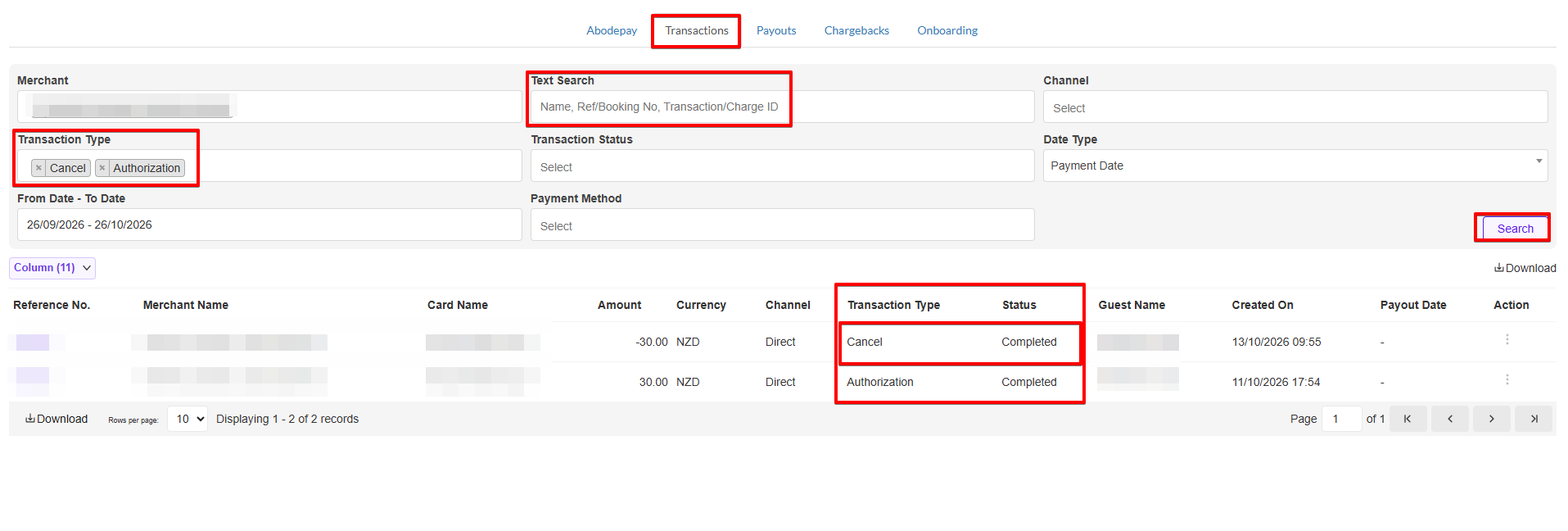
If you can see a Cancel transaction with the status Completed, the pre-authorisation has been released on the Abode side.
Why does the hold still show after I cancel?
When you cancel a pre-auth in Abode, the cancellation is completed straight away on our side. The hold is on the guest’s card, so the guest’s bank decides when the funds appear in their available balance again.
How long this takes depends on the bank and the country. Some banks release the funds within a few business days. Others can take 5 to 10 business days.
What can I do if the hold is still there after several days?
If the hold is still showing after 5 to 10 business days from the cancellation date, your guest can contact their card issuer (bank). It helps to give the bank:
- The cancellation date
- The amount of the pre-authorisation
- The property name
If the bank asks for more details, contact Abode Support and we can help.