
This article applies only to customers using the AbodePay payment solution. If you are using a different payment provider, some steps or settings described here may not apply to your account.
On the AbodePay settings page, you'll see several configuration options:
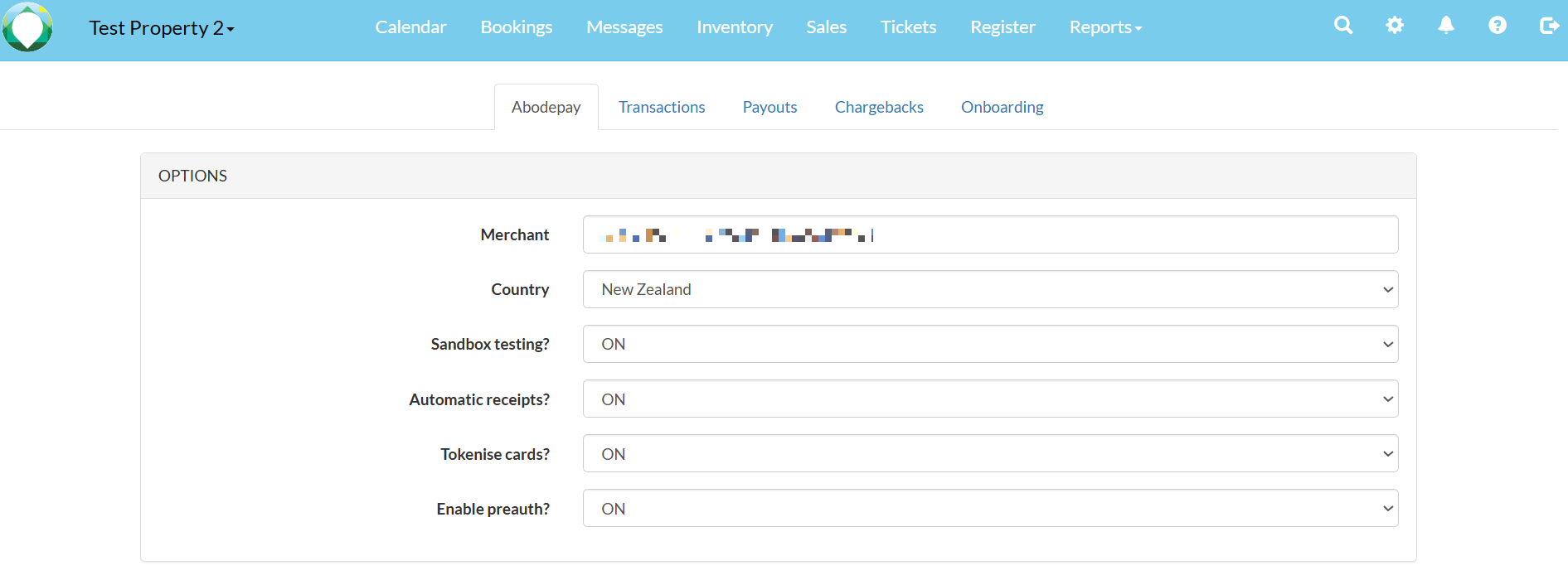
- Merchant ID: Your unique merchant identifier. This confirms your account is active.
- Sandbox Testing: Should be set to OFF for live accounts. This is only used for testing purposes.
- Automatic Receipts: We recommend keeping this ON so customers automatically receive payment receipts.
- Tokenise Cards: Should be ON. This replaces customer card numbers with secure tokens stored by our payment processor, allowing you to charge cards directly from the booking. No actual card numbers are held on your system.
- Enable Preauth: Optional. When turned on, this allows you to place pre-authorisations (holds) on a customer's card for a set amount (e.g., security deposits).
About Pre-authorisations
A pre-authorisation reserves a set amount on the customer's card without actually processing the transaction. This is ideal for security deposits.
Key points:
- Pre-authorisations can be cancelled at any time.
- For NZ and Australian cardholders, the released amount typically shows as available within 2-3 business days.
- European and some Asian cards (e.g., Japan) may take longer: Up to several weeks.
- If a customer reports that the pre-authorisation hasn't been released after cancellation, contact your AbodePay representative. They can provide a letter with the transaction ID for the customer to send to their bank.